BFBM Bet History Explorer with graphs and monthly P/L tables

Turn your BFBM Bet History into all these graphs, tables and key statistics!
Great news. A BFBM user, Andy, has programmed his own bet history explorer that makes it easy to turn the BFBM bet history into graphs, tables and key statistics.
Super simple to use. Just upload the bet history file as it is. Done! No fiddling with file formats.
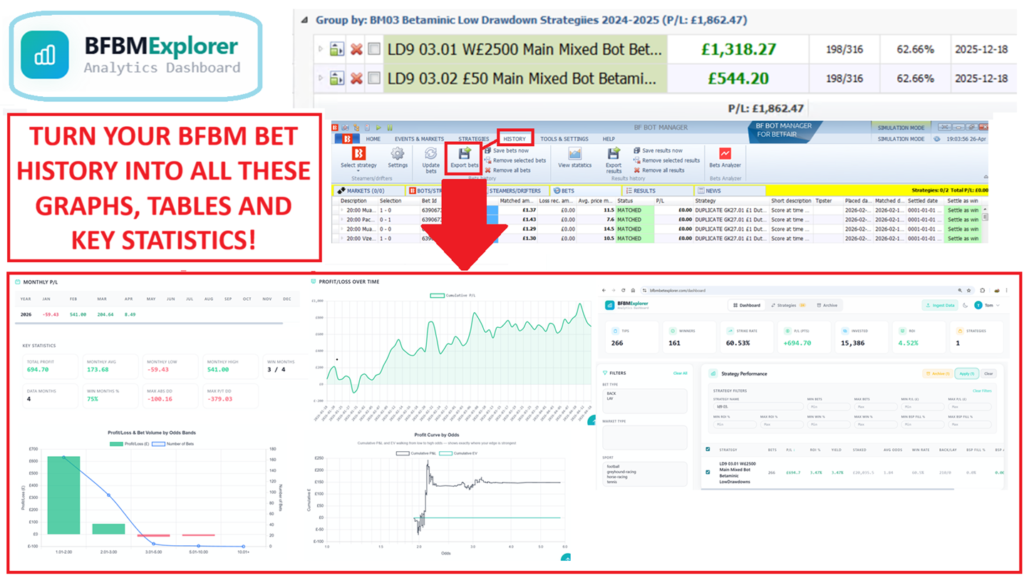
BFBM Bet Explorer Features:
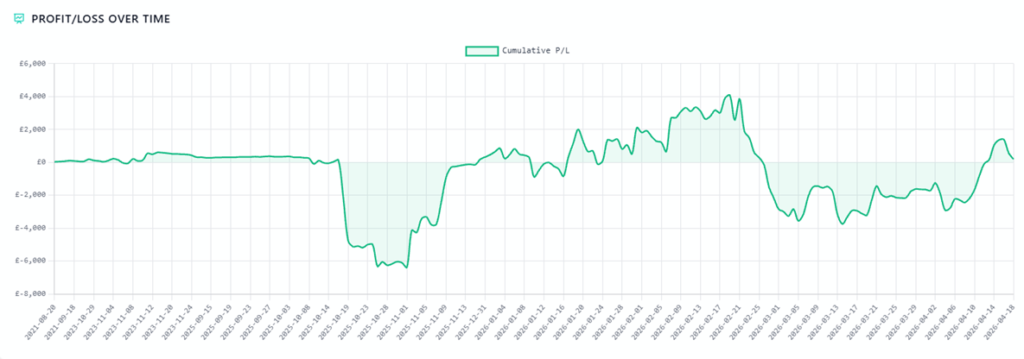
- Graphs with profit and loss over time
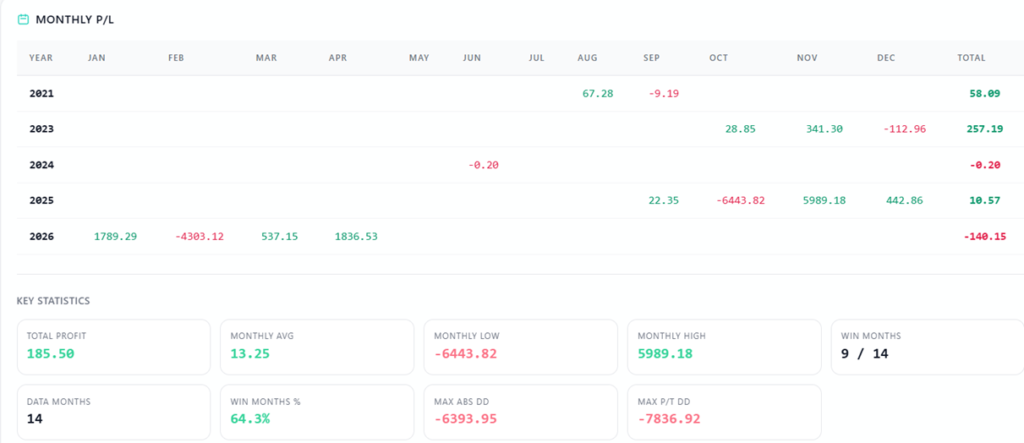
- Tables of monthly profit/loss
- Key stats such as monthly high/low/average, max drawdown, number of winning/losing months, win %, months of data, etc.
- ROI and P/L broken down by odds ranges
- Easily see both absolute maximum drawdown and peak to trough maximum drawdown.
- Rank all your strategies by ROI, number of bets, P/L, average odds, win rate
- Filter all your strategies by minimum and maximum ranges for ROI, number of bets, P/L, average odds, win rate to focus only on the type of bots you are looking for
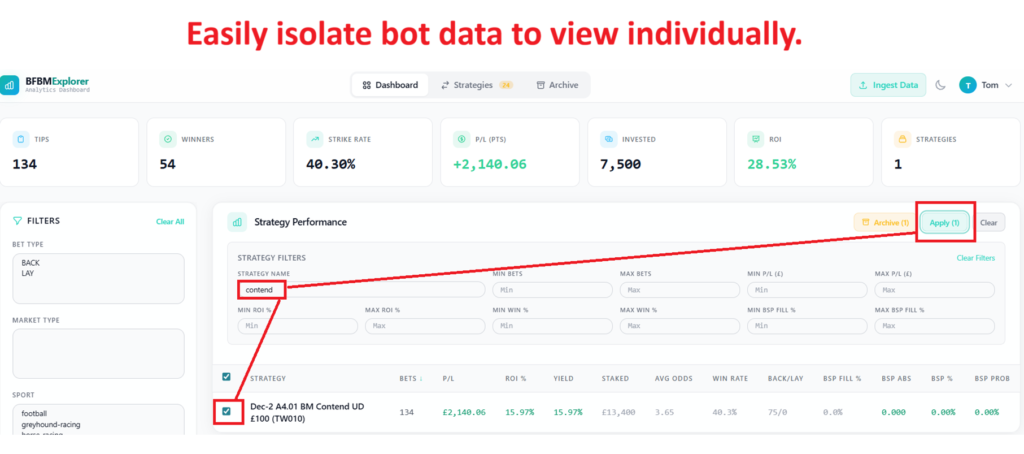
- Easily isolate single strategies or view a group of strategies together. A search bar also helps you find and filter by strategy name text.
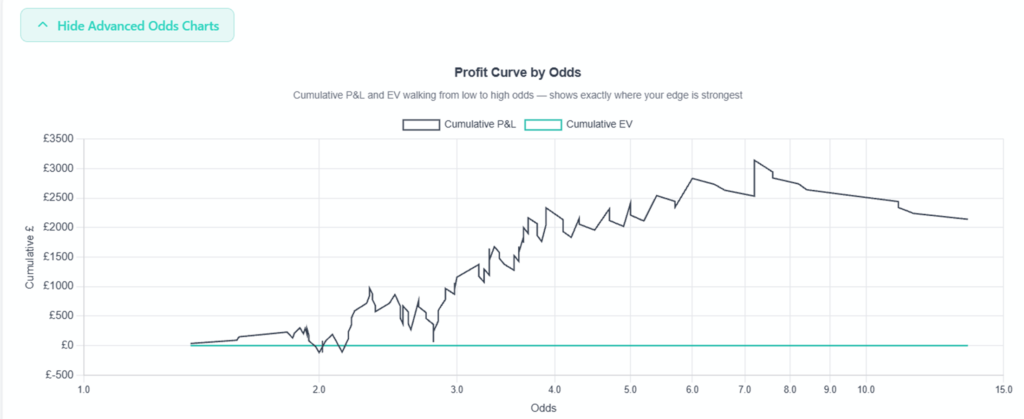
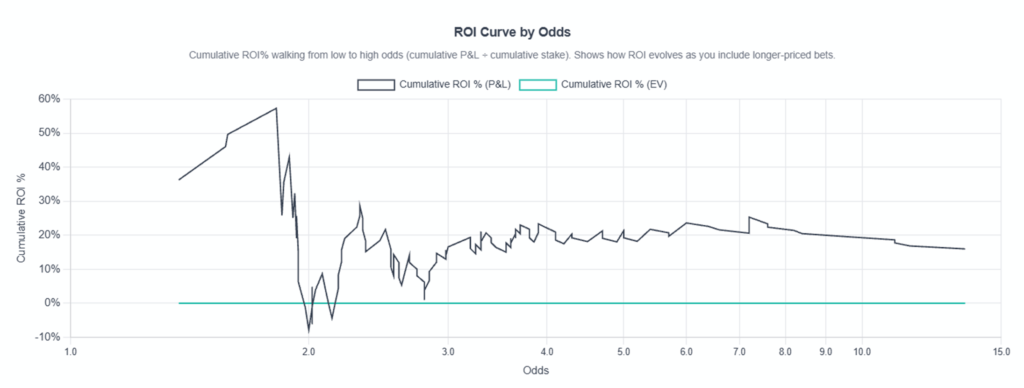
- Advanced charts to show profit curve by odds (Profit Curve by odds, ROI curve by odds)
- Import multiple overlapping bet histories and the software will automatically ignore duplicates. No need to sort files yourself.
- All cloud based, so it stores your bet history for you. Never lose your bet data again.
- See ROI for all staking plans, not just level stakes.
- Staking Analysis by applying Level Stakes and Target Profit staking plans to your data. (More staking plans may be added later depending on demand.)
- Commission correctly calculated for hedge bots. And that is something even the standard BFBM bet history cannot do!
- Perfect for big data analysis of years of bet history. Handles hundreds of thousands of bets.
See your bet history like you’ve never seen it before. This is an absolute must.
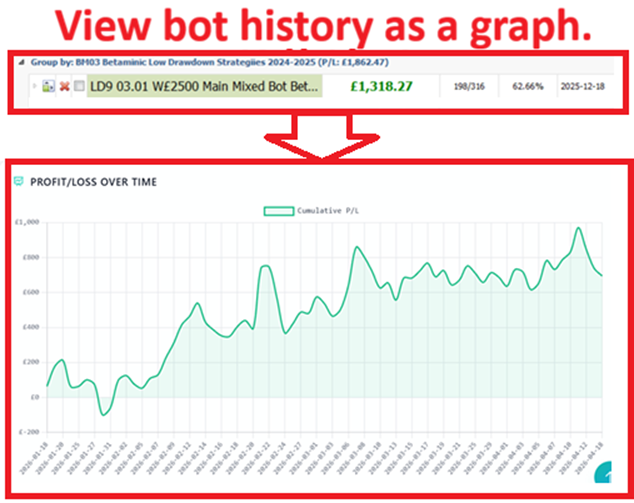
1 Graphs with profit and loss over time
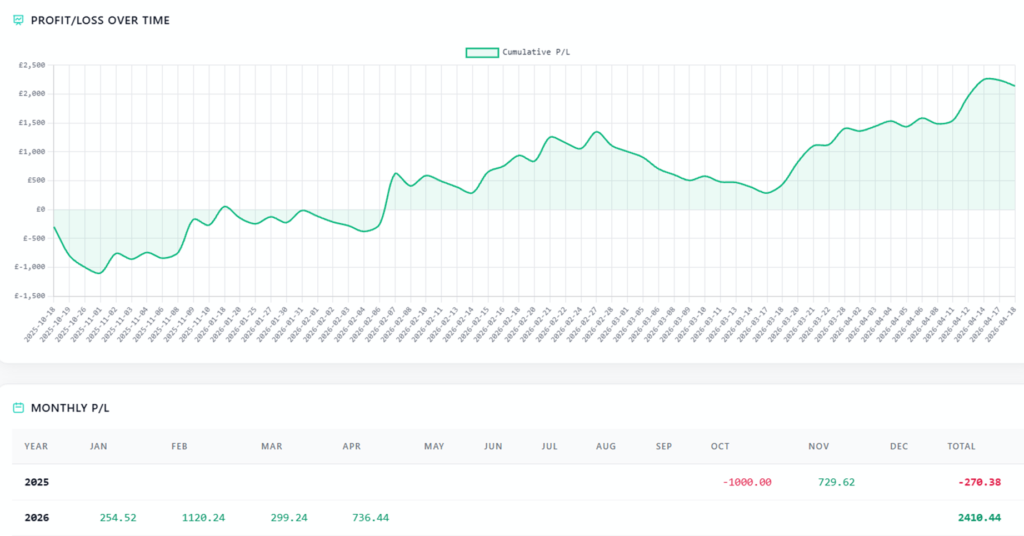
For me, this is the most important function. I often see a bot in my BFBM with hundreds of bets and in profit, but I want to know what the profit journey of that bot was. Is it smooth, is it a lucky run, are the drawdowns big, is it volatile? The BFBM Explorer can do that.
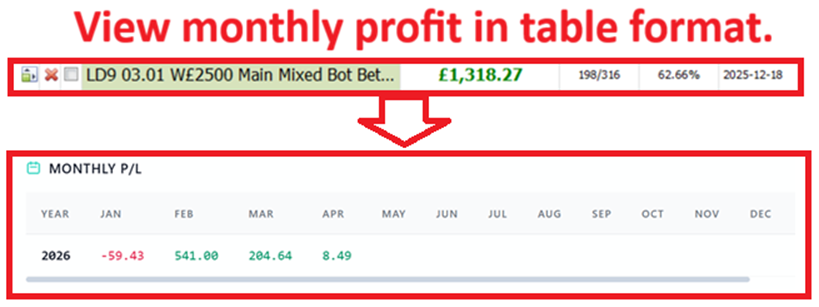
2 Tables of monthly profit/loss
It can sort the bot results into a monthly table so that you can see if the bot has a monthly consistency or if its profit all came in a few months.
3 Key stats
This does the hard work of calculating the monthly profit high/low/average, maximum absolute drawdown, maximum peak to trough drawdown, number of winning/losing months, month win %, months of data, etc. It makes it much easier to get a very quick grasp on the character of a bot since we often don’t really pay attention to them until they have enough data to be properly analysed.
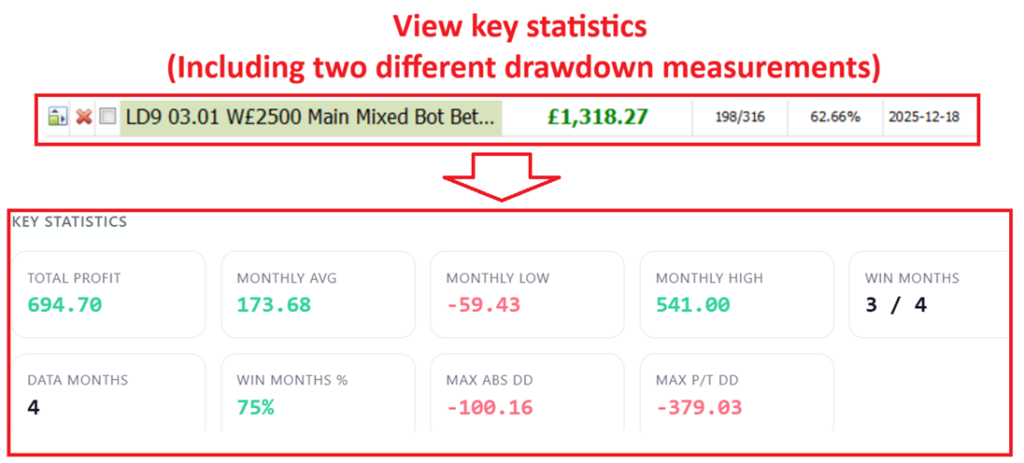
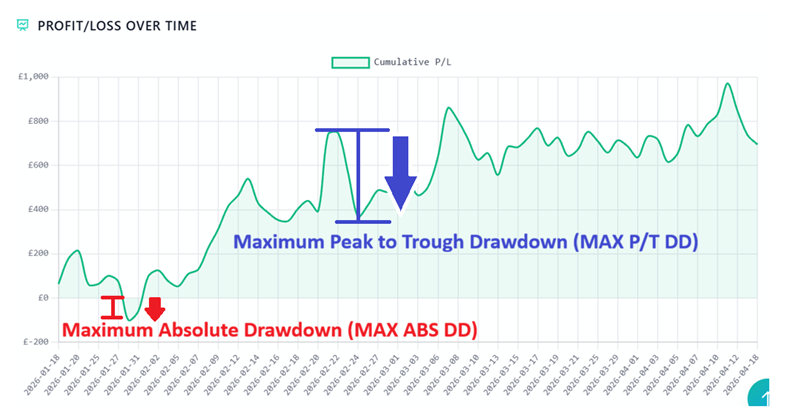
What is maximum absolute drawdown (MAX ABS DD) and how is it different to maximum peak to trough drawdown (MAX P/T DD)?
Maximum Absolute Drawdown (MAX ABS DD) is the worst losing run (drawdown) calculated from starting at the zero profit level.
Maximum Peak to Trough Drawdown (MAX P/T DD) is the worst losing run (drawdown) calculated from starting at the highest profit level.
4 See ROI for all staking plans, not just level stakes.
At the top of the bet explorer, if you select and isolate a strategy with a simple checkbox, it will tell you the amount invested and the ROI for that bot. This is really useful for non-level stakes bots which have usually been hard to work out ROI for ourselves.

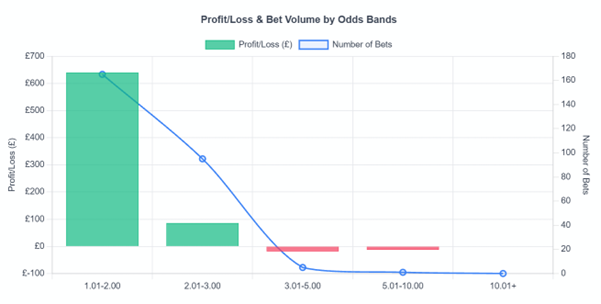
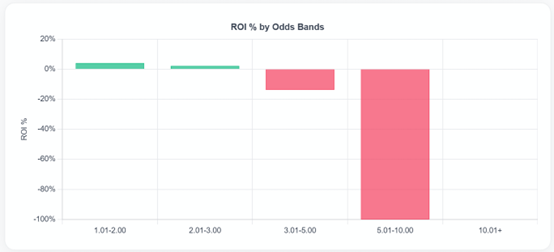
5 ROI and P/L broken down by odds ranges
The BFBM Explorer shows you which odds bands work best for your bot and which odds bands you might want to consider reviewing to improve profit and yield.
6 Rank and filter bot strategies easily
You can import all of your bet history from multiple bet history files and from multiple BFBM instances.
This might lead you to having thousands of bets and bots.

You can then rank strategies by number of bets, profit and loss, yield, amount staked, average odds, win rate, strategy name, etc.
You can see straight away which bots have the most data or the best yield or by the factor that is important to you.
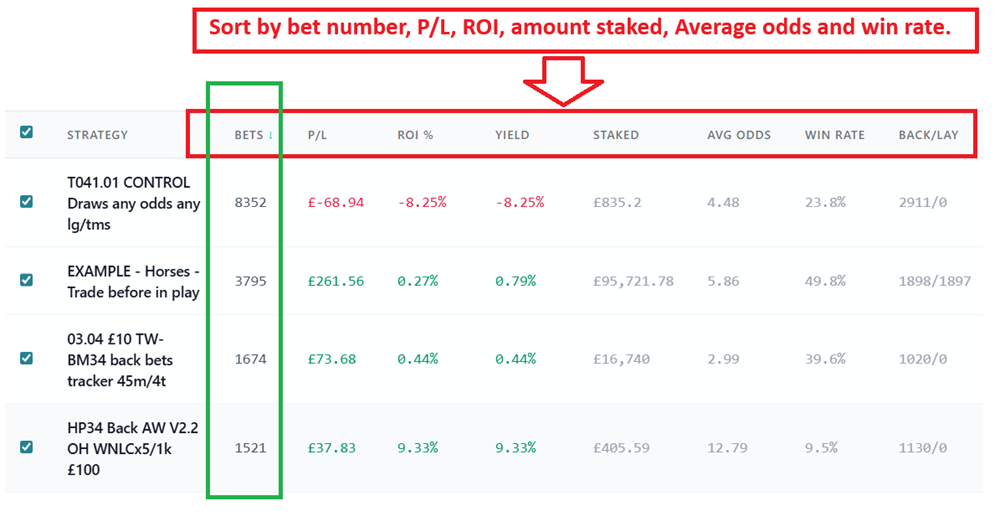
You can also filter all your strategies by minimum and maximum ranges for ROI, number of bets, P/L, average odds, win rate to focus only on the type of bots you are looking for
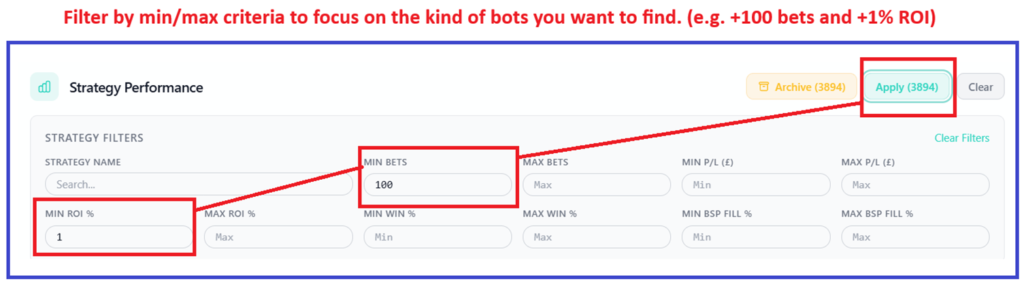
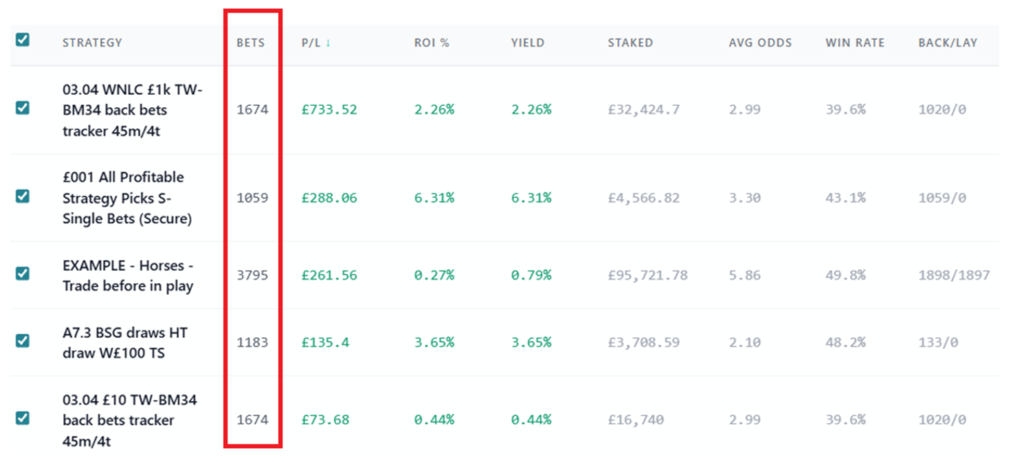
You can then rank strategies that fit your criteria and see which ones have most bets…
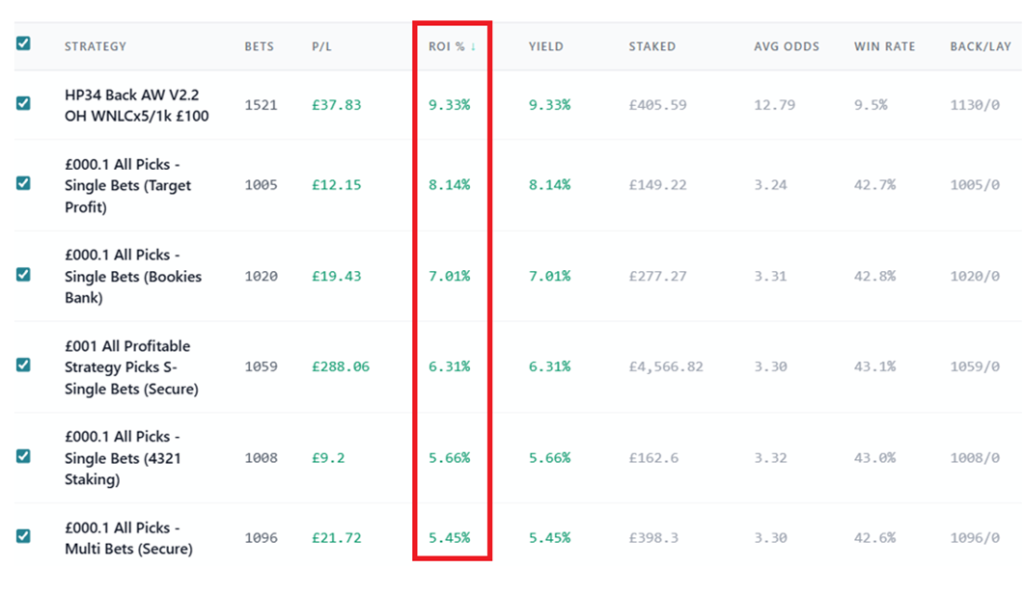
Or which ones have the highest ROI. It makes it much easier to see which bot strategies are worth focusing on.
7 View bot data by itself or as groups
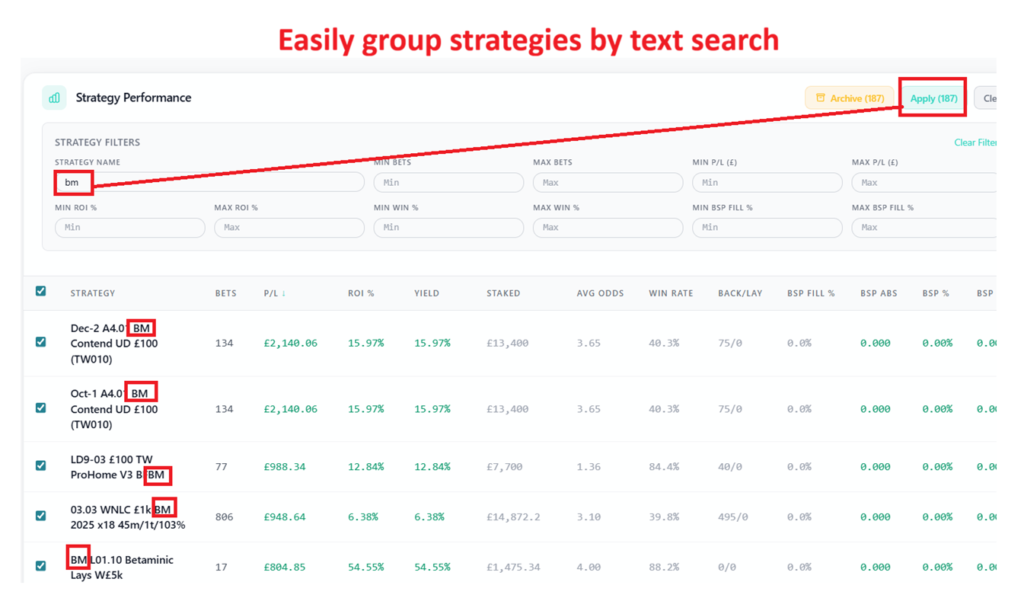
You can easily isolate single strategies or view a group of strategies together to see how the results work together, like the aggregator function on Betaminic.
A search bar also helps you find and filter by strategy name text. If you have bot codes like “BSG”, “LTD” or “O1.5” in all bots of a certain type, then you can easily find them and group them together to see how they look as a set.
8 Advanced charts to show profit curve by odds
You can view Profit Curve by odds or ROI curve by odds with advance charts.
Profit Curve by odds – Cumulative P&L and EV walking from low to high – shows exactly where your edge is strongest)
9 Web based App – import and auto sorted for you
This is a really important point. You can Import multiple overlapping bet histories, and the software will automatically ignore duplicates. No need to manually sort files yourself. This is really useful for BFBM users because if we manually export bet files, we tend to have lots of overlapping time periods with duplicate bets.
The app is cloud based, so it stores your bet history for you. Never lose your bet data again.
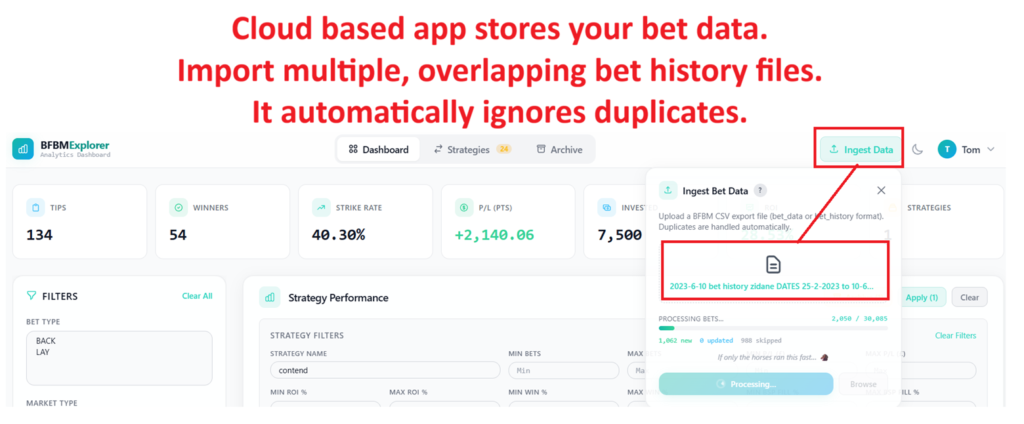
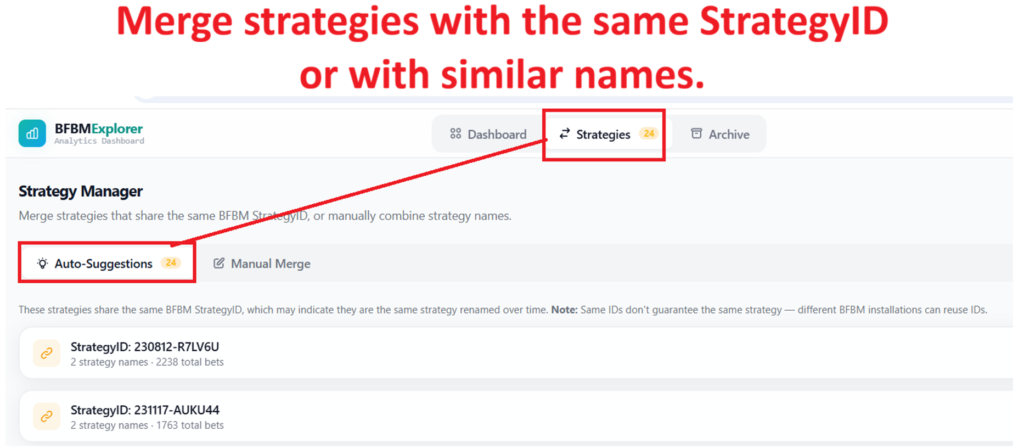
It also has a very useful function to merge strategies that have different names but the same StrategyID. We sometimes change our bot names over time, and this tool can help us merge those into one strategy.
There is also a function to manually merge strategies that have different StrategyIDs but we know are the same strategy.
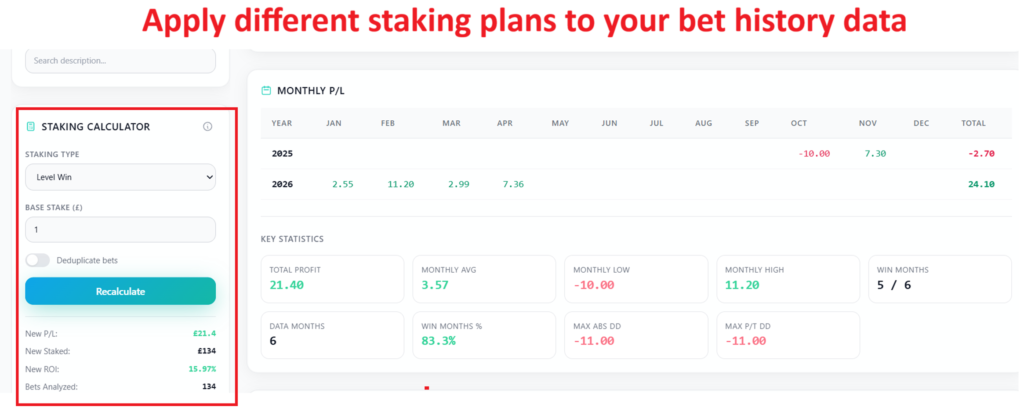
10 Apply staking plans to bet data
Staking Analysis is possible by applying Level Stakes and Target Profit staking plans to your data.
This allows you to see three staking plans, your original bot staking plan results, level stakes results and Target Profit (Level Win) results.
This is really useful if you are worried that you have changed your stakes settings in a bot. If you select the Level Stakes or Level Win (Target Profit), it allows you to see proper strategy performance to consistent stakes.
I always found this was one of the things that annoyed me most about it as I would inevitably tweak stakes as I gained or lost confidence in strategies over time and you’d have no idea whether the profit just came from a period of high stakes or it was actually a decent strategy. This function of setting level stakes or level win (target profit) really helps you see if the strategy is a good one.
(More staking plans may be added later depending on demand.)
11 Commission correctly calculated for hedge bots.
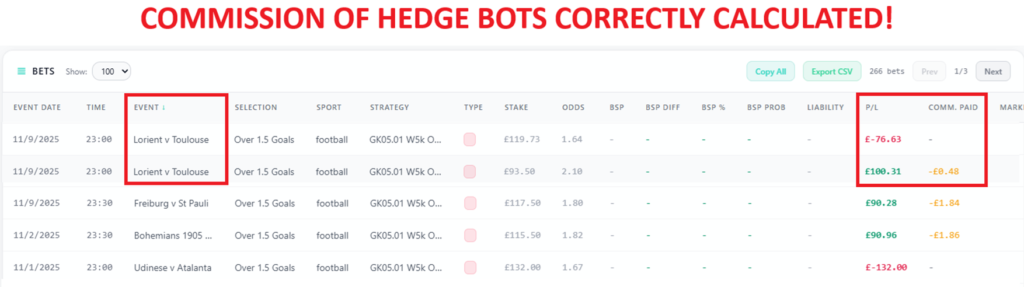
The standard BFBM bet history does NOT show you results minus commission. This is because the file shows all bets separately.
So any bot that places a back and lay trade in the same market treats those bets as separate in the bet history file.
With the BFBM Bet Explorer, it groups all the bets by one strategy in one market together and calculates the commission based on the overall profit. That commission is then taken from first winning bet in that market.
The standard BFBM bet history does not remove commission from the winning bets. This gives a false impression of results.
A simple removing 2% from winning bets would give incorrect results for hedge bots with multiple bets in one market.
It is complex to program formulas yourself in excel to find and group markets and then take commission from overall profit, but BFBM Bet Explorer does that for you.
In the above example, just removing 2% from +100.31 profit would be 2.00 GBP commission, but the reality is that there was another back bet that lost, so the actual profit was 100.31 – 76.63 = 23.68 GBP. 2% of that would be 0.48 GBP! If you repeat such an error thousands of times, then you will get incorrect bet history results. But BFBM Bet Explorer can calculate this correctly for you.
And that is something even the standard BFBM bet history cannot do!
Find your old bet history files and import them now!
I have scoured my PC looking for old bet history files.
I used 2 methods
1 Searched my PC for “bet history”
2 Searched my PC for any .csv files larger than 2MB to find bet history files I may have renamed and had though lost.
You can paste this into the Windows search bar to find them: *.csv size:>2MB

Managing Your Bet History – Autosave!
The BFBM stores the last 30,000 bets by default. If you go over that limit, it starts overwriting old bets, so you can lose you old bet history if you don’t pay attention.
The BFBM Bet History Autosave program backs up your bet history everyday for you in one big file. Then you can just import that into the BFBM Explorer.
Never lose your bet history again!
BFBM Bet Explorer – it works!
Andy has done a great job creating a BFBM bet history program that actually works.
Other programs I have used before often rejected my files because of format problems that I could not understand since I was using the default bet history file with no edits.
But BFBM Bet Explorer really does work with your BFBM bet history file. Just import it and see the data in all its glory!
Bet history column names & adding extra columns
Basically, default files work and customized files work
The BFBM Bet Explorer has been created with the aim of accepting as wide a range of BFBM bet history formats as possible. In the BFBM Bet History screen, it is possible to use the column choose to add a variety of extra columns.
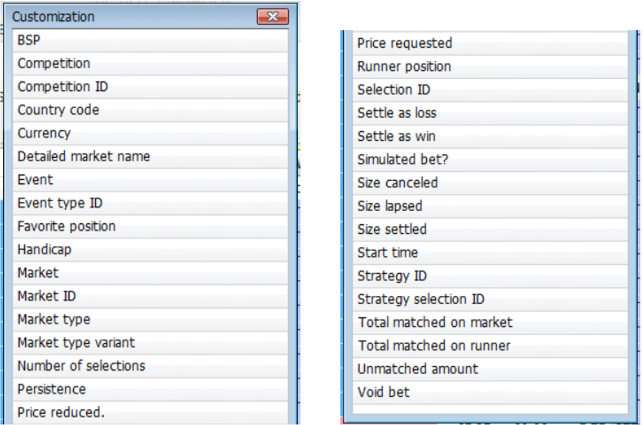
The BFBM Bet Explorer should in theory handle any combination of fields that BFBM can output, and so it might be worth just selecting as many fields as possible now to generate as much data as possible, as you never know what you might want to look at later on. If there is a request from a user, Andy will try to add that column to the BFBM Bet Explorer.
The minimum fields it requires for bets to be ingested are:
Bet ID, Status, P+L, Placed Date, Strategy Name, Selection Name
Event time is optional but highly recommended. All those fields appear in the default bet history of BFBM, and it is unlikely that anyone would remove them, but even this program needs some minimum fields to process the data.
Price
£40 for 6 months (£6.67 per month)
£60 for 12 months (£5 per month)